Are you looking for a proven way to increase your booking rates and reward your most loyal clients? In the competitive world of service-based businesses, a well-timed discount can be the difference between a bounced visitor and a long-term customer. The Bookly Coupons Add-on is the ultimate tool for WordPress users who want to integrate professional, flexible, and automated promotional codes directly into their appointment scheduling system.
Whether you run a spa, a law firm, or a fitness studio, offering discounts is a powerful marketing strategy. With the Bookly Coupons Add-on, you gain full control over how, when, and to whom these discounts are applied, ensuring your marketing efforts always align with your business goals.
The Bookly Coupons Add-on is an essential extension for the popular Bookly Pro plugin. It allows business owners to create and manage promotional codes that clients can apply during the checkout phase of their booking process.
Unlike generic discount tools, this add-on is built specifically for the Bookly ecosystem. This means it understands the nuances of your services, staff members, and appointment types. You can offer a flat-rate discount (e.g., $10 off) or a percentage-based reduction (e.g., 20% off), providing the flexibility needed for various seasonal campaigns or referral programs.
By integrating the Bookly Coupons Add-on into your website, you remove the friction from the payment process and provide an immediate incentive for users to complete their reservations.
Flexible Discount Types: Choose between fixed amount deductions or percentage-based discounts.
Automated Code Generation: Quickly generate unique, random codes or create your own custom strings (e.g., “SUMMER20”).
Service & Provider Binding: Restrict coupons to specific services or particular staff members.
Usage Limits: Control how many times a coupon can be used globally or limit it to once per customer.
Expiration Dates: Set “Valid From” and “Valid To” dates to create urgency for seasonal offers.
Customer-Specific Coupons: Bind a discount code to a specific client to provide a personalized experience.
Cart Requirements: Set a minimum or maximum number of appointments in the cart to trigger a discount.
Detailed Analytics: Track the performance and usage statistics of every coupon code within the Bookly dashboard.
Shortcode Integration: Automatically include used coupon details in SMS and email notifications using the {coupon} placeholder.
The Bookly Coupons Add-on goes beyond simple price cuts. When creating a coupon, you can combine a percentage discount with a fixed deduction. For example, you could offer “10% off plus an additional $5 deduction” for a premium service. The plugin automatically calculates the final price using a logic-based formula: Service Price - Discount (%) - Deduction.
To protect your profit margins, the Bookly Coupons Add-on provides granular control over coupon logic. You can prevent “coupon abuse” by enabling the “Once per customer” setting. Furthermore, if you only want to promote a new service, you can configure the coupon to work only for that specific service, ignoring the rest of your catalog.
Marketing is all about timing. The date limit feature allows you to schedule promotions in advance. You can set a Black Friday coupon to automatically activate at midnight and expire 24 hours later. This “set it and forget it” functionality ensures your promotions run smoothly without manual intervention.
Increased Conversion Rates: Coupons are a psychological trigger that encourages “on-the-fence” visitors to commit to a booking.
Enhanced Customer Loyalty: Rewarding repeat clients with exclusive codes keeps your business top-of-mind.
Better Marketing ROI: By tracking which codes are used most frequently, you can identify which marketing channels (Facebook, Email, Instagram) are driving the most revenue.
Streamlined Operations: No more manual refunds or price adjustments; the Bookly Coupons Add-on handles the math and the payment processing automatically.
Professionalism: A dedicated “Coupon Code” field at checkout makes your business look established and technologically savvy.
The Bookly Coupons Add-on is designed for any business using the Bookly Pro WordPress plugin. This includes:
Beauty and Wellness: Spas, hair salons, and massage therapists offering “New Client” specials.
Healthcare Professionals: Private clinics or therapists providing discounts for mental health awareness months.
Education and Coaching: Tutors or fitness coaches offering bulk-buy incentives.
Professional Services: Accountants or consultants using referral codes to grow their client base.
Event Organizers: Selling early-bird tickets or group discounts for workshops.
A yoga studio uses the Bookly Coupons Add-on to offer a 50% discount on the first class. They create a code “WELCOME50” and limit it to “Once per customer.” This brings new faces through the door at a low entry cost.
A car detailing business experiences a slow period in February. They generate a code “WINTERWASH” for a $20 deduction, valid only for the month of February. They send this out via the Bookly SMS notification system to their entire database.
A multi-specialty clinic wants to promote a new therapist. They create a coupon that only applies when the “Junior Physiotherapist” is selected as the provider, helping the new staff member build their schedule quickly.
Native Integration: Works perfectly with the Bookly UI; no clunky third-party windows.
Highly Granular: Control every aspect from service type to customer identity.
Lightweight: Does not bloat your WordPress site or slow down the checkout process.
One-Time Payment: Usually available as a lifetime license, avoiding monthly SaaS fees.
Requires Bookly Pro: You cannot use this add-on with the free version of Bookly.
Woo Commerce Limitation: If you use the Bookly Woo Commerce add-on, these specific Bookly coupons will not function; you would use Woo Commerce coupons instead.
Setting up the Bookly Coupons Add-on is straightforward even for non-technical users:
Purchase and Download: Obtain the zip file for the add-on from the official source.
Upload to WordPress: Navigate to Plugins > Add New > Upload Plugin and select the file.
Activate: Click “Activate Plugin” once the upload is complete.
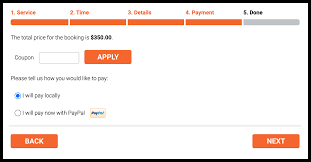
Enable in Appearance: Go to Bookly > Appearance. Under the Payment tab, ensure the “Show coupons” checkbox is ticked.
Create Your First Coupon: * Go to the new Coupons section in the Bookly menu.
Click Add Coupon.
Define your code, discount type, and restrictions.
Save, and you are ready to start promoting!
Test Your Codes: Before launching a major campaign, try a test booking to ensure the discount applies correctly to the right services.
Use Clear Naming: Instead of random strings, use human-readable codes like “SAVE10” or “FALL2026” for better brand recognition.
Combine with Notifications: Use the {coupon} placeholder in your “Appointment Approved” emails so clients have a record of the discount they received.
Monitor Statistics: Check the “Payments” section regularly to see which coupons are being used the most. Use this data to refine your future offers.
Q: Can I limit a coupon to a specific customer? A: Yes. In the coupon settings, you can select a specific customer from your database. The coupon will only be valid when that client is logged in or identified by their email.
Q: Does the Bookly Coupons Add-on work with deposit payments? A: Yes, but with a specific logic. The deposit amount is usually calculated from the total price before the coupon is applied, unless configured otherwise in your deposit settings.
Q: Can a client use two coupons at once? A: Currently, the Bookly Coupons Add-on allows only one coupon code to be applied per booking transaction.
Q: Do these coupons expire automatically? A: Yes. If you set a “Date limit,” the coupon will become invalid exactly at the end of the specified date, ensuring your limited-time offers are strictly enforced.
Q: Can I offer a free service using a 100% discount coupon? A: Absolutely. You can set the percentage discount to 100%, allowing clients to book an appointment without any payment.
The Bookly Coupons Add-on is more than just a discount tool; it is a strategic asset for growing your online booking business. By offering targeted, time-sensitive, and service-specific promotions, you can effectively fill your calendar and keep your customers returning.
Don’t let potential clients slip away to competitors who offer better incentives. Take control of your marketing strategy today.
Ready to boost your bookings? Install the Bookly Coupons Add-on and start creating irresistible offers for your clients right now!
You must log in and be a buyer of this download to submit a review.