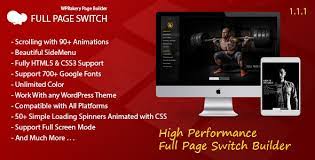
In the competitive world of web design, capturing user attention within the first few seconds is critical. If you are looking to transform your standard WordPress website into an immersive, cinematic experience, the FULL PAGE SWITCH WITH SIDE MENU – ADDON FOR WPBAKERY PAGE BUILDER is the definitive tool for the job. This powerful extension allows you to break away from traditional scrolling layouts, offering a high-end full screen experience that feels more like a professional presentation than a simple webpage. Designed specifically for the WP Bakery Page Builder, this addon provides seamless integration and unparalleled creative control.
The FULL PAGE SWITCH WITH SIDE MENU – ADDON FOR WPBAKERY PAGE BUILDER is a premium WordPress plugin extension designed to create modern, “one-page” scrolling websites. Instead of the typical continuous scroll, this addon divides your content into distinct full screen sections. When a user scrolls, the page smoothly “switches” or “snaps” to the next section using one of nearly 100 different transition effects.
What sets this addon apart is its sophisticated side menu navigation. As users navigate through your content, the side menu provides a clear visual indicator of where they are in the story you are telling. It is not just a layout tool; it is a conversion-focused design framework that ensures your message is delivered clearly, one screen at a time.
97+ Unique Transition Effects: From classic slides to complex 3D flips and fades.
Intuitive Side Menu Navigation: A sleek, customizable sidebar that acts as a global navigation hub.
WPBakery Native Integration: Drag-and-drop your favorite elements directly into full screen sections.
Retina-Ready Logo Support: Ensure your branding looks crisp on high-resolution displays.
700+ Google Fonts: Full typography control to match your brand identity.
Mobile & Tablet Optimized: Custom padding and responsive controls for every device.
One-Click Demo Import: Get started instantly with sample data and pre-configured layouts.
Lightweight Performance: Built with HTML5 and CSS3 for fast loading and smooth animations.
Custom Backgrounds: Apply images, colors, or gradients to the side menu and individual sections.
The heart of the FULL PAGE SWITCH WITH SIDE MENU – ADDON FOR WPBAKERY PAGE BUILDER lies in its animation engine. With 97 transitions, you can choose the perfect mood for your site. Whether you want a professional “Push” effect for a corporate landing page or a creative “Cube” transition for a photography portfolio, the possibilities are virtually endless.
Navigation is often a pain point for full screen sites. This addon solves that with a dedicated side menu. You can customize the width, background, and alignment. It supports custom icons and text, allowing users to jump directly to any section of the page without having to scroll through the entire sequence.
You don’t need to learn a new interface. This addon works as a set of elements within your existing WP Bakery Page Builder environment. You simply wrap your content in the “Full Page Switch” container and add “Section” elements. Inside those sections, you can use any standard WP Bakery widget—rows, text blocks, images, or even other third-party addons.
Using the FULL PAGE SWITCH WITH SIDE MENU – ADDON FOR WPBAKERY PAGE BUILDER offers several strategic advantages for both designers and business owners:
Increased User Engagement: Full screen layouts eliminate distractions. By focusing the user’s entire viewport on one piece of content, you significantly increase the chances of your message being read.
Professional Aesthetic: This style of “snapping” navigation is a hallmark of high-budget agencies and premium product launches. You can achieve this look for a fraction of the cost.
Improved Storytelling: One-page websites are perfect for narrative-driven content. You can guide your visitor through a logical flow—from the problem and solution to testimonials and the final call to action.
No Coding Required: Everything is handled via the WP Bakery interface. You can adjust transitions, colors, and menu settings through simple dropdowns and toggles.
Who should use the FULL PAGE SWITCH WITH SIDE MENU – ADDON FOR WPBAKERY PAGE BUILDER?
Creative Agencies: To showcase their portfolio in a bold, modern way.
SaaS & App Developers: Perfect for creating landing pages that highlight features step-by-step.
Event Organizers: Ideal for event landing pages that cover speakers, schedules, and ticket sales.
Photographers & Videographers: Full screen sections are the perfect canvas for high-resolution visual media.
Freelance Web Designers: A great tool to offer clients a unique, “premium” layout option that stands out from competitors.
Imagine launching a new smart device. The first screen shows a stunning hero image. The user scrolls, and the page flips to show technical specs. Another scroll reveals customer reviews. The FULL PAGE SWITCH WITH SIDE MENU – ADDON FOR WPBAKERY PAGE BUILDER makes this high-end flow effortless to build.
A graphic designer can use this addon to dedicate each “switch” to a different project. The side menu lists the project names, allowing potential clients to navigate the portfolio like a digital look book.
Replace traditional PowerPoint or PDF presentations with a live, interactive website. Companies can use this addon to present annual reports or internal pitches in a format that works on any browser.
Massive variety of animations (97 total).
Seamlessly extends the familiar WP Bakery interface.
Highly responsive and mobile-friendly.
Beautifully integrated side menu that enhances UX.
One-time setup with one-click demo data.
Requires WP Bakery Page Builder (not a standalone plugin).
Full screen layouts may require high-resolution images to look their best, which can impact page weight if not optimized.
Setting up the FULL PAGE SWITCH WITH SIDE MENU – ADDON FOR WPBAKERY PAGE BUILDER is straightforward:
Ensure Requirements are Met: Make sure you have WordPress installed and the WP Bakery Page Builder plugin active.
Upload the Addon: Go to Plugins > Add New in your WordPress dashboard and upload the plugin zip file.
Activate: Click the “Activate” button.
Create a New Page: Navigate to Pages > Add New and switch to the WP Bakery Backend or Frontend editor.
Add the Element: Click the “+” button to add a new element and search for “Full Page Switch.”
Configure Sections: Add “Full Page Sections” inside the main container. Each section represents one full screen slide.
Customize the Side Menu: Open the element settings to define your menu colors, typography, and logo.
Optimize Images: Since full screen sections rely on large visuals, always use compressed Webby or JPEG files to maintain fast loading speeds.
Use H2 Headings in Every Section: To maintain SEO rankings, ensure each section has a clear heading structure. The FULL PAGE SWITCH WITH SIDE MENU – ADDON FOR WPBAKERY PAGE BUILDER allows you to add these headings within each slide.
Keep Content Concise: Because users see only one screen at a time, avoid long walls of text. Use bullet points and clear CTAs.
Test on Mobile: While the plugin is responsive, check that your custom padding settings look good on smaller screens.
Leverage the Transitions: Don’t just stick to the default. Experiment with the 97 effects to see which one matches your brand’s energy.
Q: Does this addon work with any WordPress theme? A: Yes, the FULL PAGE SWITCH WITH SIDE MENU – ADDON FOR WPBAKERY PAGE BUILDER is designed to be theme-independent and works with any theme that supports WP Bakery.
Q: Can I use video backgrounds for the full screen sections? A: Absolutely. Since it integrates with WP Bakery, you can use the standard row settings to add video backgrounds behind your content in any section.
Q: Is the side menu mandatory? A: No, you can choose to enable or disable the side menu in the plugin settings, though it is highly recommended for better user navigation.
Q: Will this affect my site’s SEO? A: Not at all. The plugin uses clean HTML5 markup. As long as you follow standard SEO practices like using proper headings and meta tags, your one-page site will rank just like any other page.
Q: Do I need to know how to code to use the transitions? A: No. All 97 transitions are available via a simple dropdown menu in the element settings.
The FULL PAGE SWITCH WITH SIDE MENU – ADDON FOR WPBAKERY PAGE BUILDER is more than just a plugin; it is a design transformation tool. It empowers you to create world-class, immersive websites that captivate users and drive results. By combining the ease of WP Bakery with the sophistication of full screen scrolling and a dedicated side menu, you can build a site that truly stands out in 2026.
Ready to elevate your web design? Download the FULL PAGE SWITCH WITH SIDE MENU – ADDON FOR WPBAKERY PAGE BUILDER today and start building stunning full screen experiences!
You must log in and be a buyer of this download to submit a review.