Building a high-converting email list is the backbone of any successful digital business. However, managing the gap between capturing a lead and engaging them often requires multiple expensive tools and complex integrations. Enter the Visual Composer Autoresponder Addon, a powerful extension designed to streamline your email marketing directly within your favorite page builder.
If you are already using Visual Composer to design stunning websites, the Visual Composer Autoresponder Addon is the missing piece of your marketing puzzle. This addon allows you to create professional opt-in forms, connect them to world-class email services, and even trigger automated sequences without ever leaving the WordPress dashboard. In this comprehensive guide, we will explore why this tool is a must-have for marketers, developers, and business owners alike.
The Visual Composer Autoresponder Addon is a specialized extension for the WPBakery/Visual Composer Page Builder. Its primary function is to simplify the process of list building by providing a seamless interface to create, customize, and deploy subscription forms.
Unlike standard contact forms, this addon is built specifically for marketing automation. It bridges the gap between your website’s front-end design and back-end email marketing providers like Mailchimp, AWeber, and GetResponse. By utilizing the drag-and-drop power of Visual Composer, you can design forms that don’t just function well but also look beautiful and match your brand’s aesthetic perfectly.
The Visual Composer Autoresponder Addon is packed with features that go beyond simple data collection. Here are the core functionalities that set it apart:
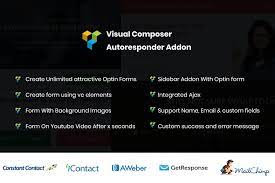
Native Drag-and-Drop Integration: Use the familiar Visual Composer interface to build forms.
Multi-Platform Support: Seamlessly connects with Mailchimp, AWeber, and GetResponse.
Video Opt-in Lock: Pause a video after a specific time and require an email to continue watching.
Ajax-Based Submissions: Forms submit without reloading the page, providing a superior user experience.
Custom Field Mapping: Collect more than just names and emails; add custom fields for deeper segmentation.
Advanced Styling Controls: Full control over typography, colors, patterns, and button alignments.
Automatic List Fetching: Your email lists are automatically pulled from your provider for easy selection.
Redirect Logic: Send users to a custom “Thank You” page or a digital download after they subscribe.
One of the standout features of the Visual Composer Autoresponder Addon is the ability to place opt-in forms directly over your videos. You can set a specific timer (e.g., 10 seconds into a video) at which point the video pauses and an attractive subscription form appears. The video only resumes once the user provides their details. This is an incredibly effective way to gate content and increase your conversion rates by leveraging “micro-commitments” from your viewers.
Setting up an API connection can be a headache for non-developers. The Visual Composer Autoresponder Addon simplifies this. Once you enter your API key, the addon fetches your existing lists automatically. You can choose which list each specific form on your site should feed into, allowing for targeted campaigns based on the page the user is visiting.
Most autoresponder plugins offer rigid templates that are hard to style. Because the Visual Composer Autoresponder Addon is an extension of the page builder, you can treat your form like any other element. You can add background images, use custom gradients, adjust padding, and even place other Visual Composer elements (like icons or text blocks) inside or around the form container.
Using the Visual Composer Autoresponder Addon offers several strategic advantages for your WordPress site:
Reduced Plugin Bloat: Instead of installing three different plugins for popups, forms, and API connections, this addon handles it all within the Visual Composer ecosystem.
Professionalism: High-quality, Ajax-powered forms give your site a polished, modern feel that builds trust with subscribers.
Increased ROI: By using the video-lock feature and targeted opt-ins, you convert a higher percentage of passive traffic into active leads.
Time Efficiency: Stop struggling with CSS to make your forms look right. The visual editor makes styling a matter of clicks, not code.
The Visual Composer Autoresponder Addon is designed for a diverse group of users:
Digital Marketers: Who need high-converting landing pages with integrated lead capture.
Affiliate Marketers: Looking to build lists by offering “locked” video content or bonuses.
SaaS Owners: Who want to capture leads for trials or newsletters directly from their product pages.
Web Design Agencies: Who want to provide their clients with a robust, easy-to-manage subscription system.
Bloggers: Seeking to grow their audience by placing attractive opt-in forms within their long-form content.
Imagine you are hosting a pre-recorded webinar. You can use the Visual Composer Autoresponder Addon to play the first 5 minutes of your tutorial. Just as you reach the “secret sauce” of your lesson, the video pauses, and a form appears asking the user to join your newsletter to see the rest. This creates an immediate value exchange.
If you are running Google Ads to a specific landing page for “Blue Widgets,” you don’t want those leads going into your general “Newsletter” list. With this addon, you can create a specific form that only maps to your “Blue Widget Interest” list in Mailchimp, allowing for highly relevant follow-up emails.
| Feature | Visual Composer Autoresponder Addon | Standard External Forms |
| Integration | Native to Visual Composer | Requires Embed Codes/Shortcodes |
| Styling | Visual Drag-and-Drop | Often requires CSS |
| Video Gating | Built-in Feature | Usually requires a separate plugin |
| Page Speed | Lightweight Ajax | Can be slow if using heavy JS |
| User Experience | Seamless within site design | Often looks “tacked on” |
Extremely easy to use for existing Visual Composer users.
No coding required for complex API integrations.
The video-lock feature is a massive conversion booster.
Ajax submission ensures users stay on your page.
Very affordable compared to monthly SaaS form builders.
Requires the WPBakery/Visual Composer plugin to function.
Limited to three main providers (Mailchimp, AWeber, GetResponse) natively, though others can be added via custom hooks.
Setting up the Visual Composer Autoresponder Addon is a straightforward process:
Purchase and Download: Secure your license and download the .zip file.
Upload to WordPress: Go to Plugins > Add New > Upload Plugin and select the addon file.
Activate: Click the “Activate” button.
Configure API: Navigate to the addon settings and enter your API key for Mailchimp, AWeber, or GetResponse.
Add to Page: Open any page with Visual Composer, click the “+” icon to add a new element, and search for “Autoresponder.”
Customize: Choose your list, design your form fields, and hit save!
To get the most out of the Visual Composer Autoresponder Addon, follow these expert tips:
Keep it Simple: Only ask for the information you actually need. Every extra field decreases your conversion rate. Usually, Name and Email are enough.
Use Compelling CTAs: Instead of “Submit,” try “Get My Free Guide” or “Unlock the Secret.”
Test Your Video Timings: If using the video lock, don’t trigger it too early. Let the user see the value of your content first.
A/B Test Your Designs: Use the addon to create two different form styles on different pages and see which one performs better.
Yes, as long as your theme supports Visual Composer (WPBakery), this addon will work seamlessly.
While the addon is designed to sync with providers like Mailchimp, you can also use it to collect data locally, though an external provider is recommended for automation.
Absolutely. You can use the custom field features to add a mandatory “Terms and Conditions” or “Privacy Policy” checkbox to your forms.
No. The addon uses optimized Ajax for submissions and only loads the necessary scripts when a form is present on the page.
Yes, the Visual Composer Autoresponder Addon includes a redirect feature that allows you to send users to any URL upon successful submission.
The Visual Composer Autoresponder Addon is an essential tool for anyone serious about growing their email list on WordPress. By combining the aesthetic flexibility of a premium page builder with the tactical power of marketing automation and video gating, it provides a complete solution for lead generation.
Stop losing potential leads to boring, static forms. Upgrade your workflow and start building a more engaged audience today.
Ready to supercharge your list building? Get the Visual Composer Autoresponder Addon now and turn your traffic into loyal subscribers!
You must log in and be a buyer of this download to submit a review.